
VALORANT Ping Test
Compare regional routes and translate your measured round trip into equivalent 128-tick server intervals.
Valorant metro telemetry
Compare 14 covered cloud metros and translate their measured latency to the 7.81 ms interval of a 128-tick server.
Ready · 14 cloud metro references
Holding angles and swinging
Run the test to see angle advice based on your fastest measured route.
| Metro reference | AWS probe hub | Median ping | Jitter | 128-tick RTT equivalent |
|---|---|---|---|---|
| N. Virginia | us-east-1Ashburn, Virginia | — | — | — |
| Illinois / Ohio Midwest | us-east-2Ohio cloud proxy for Illinois | — | — | — |
| N. California | us-west-1San Jose, California | — | — | — |
| Oregon | us-west-2Portland, Oregon | — | — | — |
| Dublin | eu-west-1Dublin | — | — | — |
| London | eu-west-2London | — | — | — |
| Frankfurt | eu-central-1Frankfurt | — | — | — |
| Stockholm | eu-north-1Stockholm | — | — | — |
| Seoul | ap-northeast-2Seoul | — | — | — |
| Tokyo | ap-northeast-1Tokyo | — | — | — |
| Singapore | ap-southeast-1Singapore | — | — | — |
| Sydney | ap-southeast-2Sydney | — | — | — |
| Mumbai | ap-south-1Mumbai | — | — | — |
| São Paulo | sa-east-1São Paulo | — | — | — |
Warm HTTP/2 AWS RTT reflects a cloud route and may differ from the Riot Direct route. Tick equivalents are units of elapsed network time. Shot confirmation also depends on server processing, buffering, frame timing and your opponent’s route. Check the options shown for your account in server select. Riot’s 128-tick explanation
| Grouping | Browser probes | Mapping note |
|---|---|---|
| North America | N. Virginia, Ohio, N. California, Oregon | Ohio is a Midwest comparison for Illinois |
| Europe | Frankfurt, London, Stockholm, Dublin | Dublin is a cloud reference outside the listed Riot selector |
| Asia and Korea | Tokyo, Seoul, Singapore, Mumbai | Compare availability within your assigned shard |
| Oceania | Sydney | Same-metro comparison |
| Brazil | São Paulo | Same-metro comparison |
Which VALORANT server should you test?
Use a VALORANT ping test to shortlist server metros, then select a low, steady option available in your shard. The client offers Server Select in the lobby when you queue solo or are party leader. North American options include Oregon, Northern California, Northern Virginia and Illinois, among others. The browser uses Ohio as a Midwest comparison for Illinois. Europe lists Frankfurt, London and Stockholm. Dublin is shown in the browser as another western European cloud route. Riot's selector allows the servers in your assigned shard. Riot's current Server Select list.
Farther east, the browser compares routes to Tokyo, Seoul, Singapore, Mumbai and Sydney. São Paulo represents the Brazil benchmark. The table covers a selection of common routing points, so you may see the client offer additional cities or service areas. A game server uses Riot Direct, which can pick different exchanges from the browser's cloud carrier. The readings make useful comparisons even when an ISP hands traffic to the two networks in different places.
Run the Gaming Ping Test for a wider look at cloud metros, then write down the two or three candidates that give you consistent readings. Next, in the VALORANT client, go to Settings, Video, Stats and show Network Round Trip Time. Enable Client FPS if performance sometimes drops during contact. Read the numbers in a match on the chosen server. If your party rotates the selected server, account for each player's edge case instead of optimizing only the leader's connection.
How do 128-tick steps relate to network RTT?
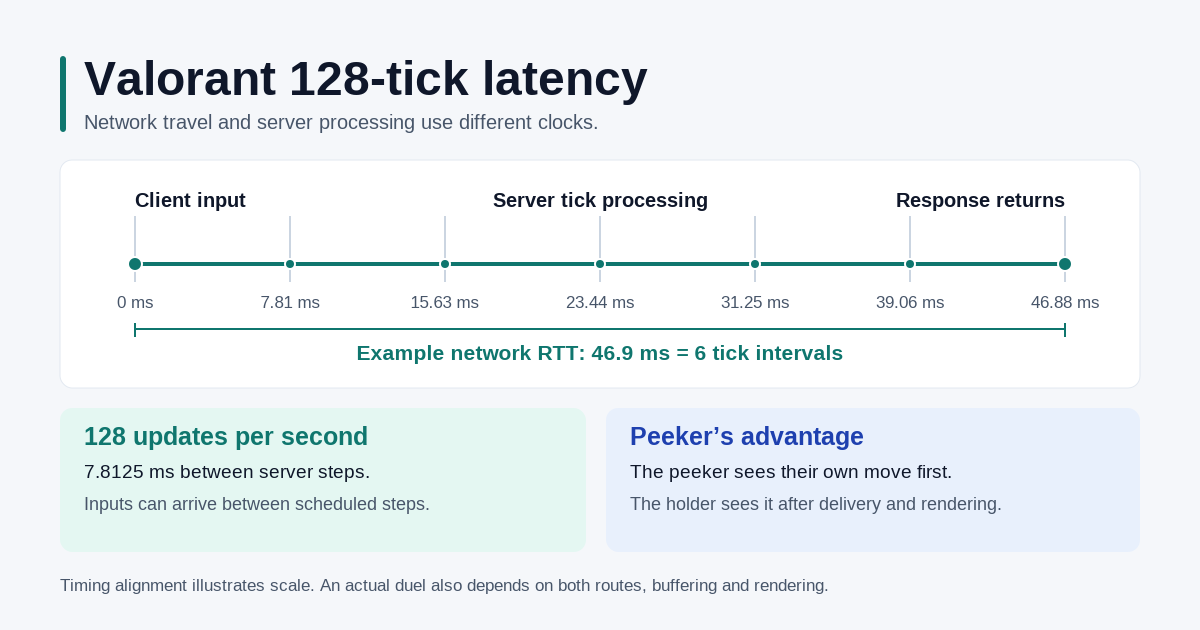
A 128-tick server has a simulation step every 7.8125 ms, and a round trip can span several of those intervals. To find the equivalent duration in steps, divide RTT by 1,000/128. A 24 ms round trip spans about 3.07 intervals. At 46.875 ms it covers six, and at 62.5 ms it covers eight. The browser displays this ratio so you can compare changes in scale from one route to another. Riot's explanation of 128-tick server timing.
A full shot path includes the input frame, travel to the server, when the action arrives relative to an update, and how clients receive and display the outcome. Network RTT combines two directions that may have different travel times. A six-step RTT neither tells you how many times the server processed a specific bullet nor reveals when your opponent saw your character. A high-refresh setup can help reduce display latency even when the selected metro stays the same.
Consider two players on a team whose medians are 22 ms and 55 ms. Both can play on a server whose cadence is identical, yet their network paths span different numbers of step intervals. A route that improves the second player's VALORANT ping by 8 ms saves approximately a step's worth of elapsed RTT on that player's path. Use the ratio for comparisons between routes you actually can join, then pay attention to consistency in the in-game Network Round Trip Time graph. A single low value can be misleading if the route has short peaks.
When should you hold an angle or swing?
With stable low VALORANT ping, holding a prepared angle is usually more predictable than on a high or variable route. A player who swings can see a stationary opponent before the opponent receives, renders and reacts to the swing. The size of that window depends on both players' network paths and frames, plus server cadence and interpolation. A network RTT chart helps choose a route, while crosshair placement, timing and cover still govern whether a duel is a good idea.
If your own path is consistently long, avoid relying on a surprise reaction from a common tight angle. Pair a peek with a flash, information or a teammate who can trade. A widened or off-angle hold can change the timing challenge for the enemy, and a player who knows the geometry has more reliable choices than blindly wide-swinging. At lower delay, practice the minimal movement needed to clear an angle and stop accurately before the shot. Pay attention to where models first appear and repeat the same setup before interpreting the result.
What should you check when the match feels delayed?
Compare the VALORANT ping test with the HUD while changing a single factor such as server preference, wired access or time of day. If the HUD network graph jumps but FPS stays steady, use the gaming lag spike timeline against a nearby cloud metro. If frame pacing worsens during utility or smokes while the network trace stays level, use the game's rendering metrics to find a client-side lead. Reproduce the symptom in a stable practice scenario before taking it into ranked.
A cloud result can disagree with Riot Direct even when both paths look stable. Recheck the actual destination and record the same map or queue on two different session times. The League of Legends shard comparison explains why the Riot network topology can differ between titles. If delay remains high on a wired route and you have no nearer eligible server, the game booster worth calculator compares the live match reading with an estimated fiber floor. It gives you a bound to check in a reversible trial while keeping the same server and game settings.
Related diagnostics
Frequently asked questions
What is a good VALORANT ping?
A steady reading below about 35 ms is a comfortable benchmark for tight duels. Stable readings above that can still feel predictable, especially with good frame pacing.
How do I change server in VALORANT?
In the lobby, use Server Select when solo or as party leader and check the listed latency before queueing. Your shard controls available servers. A 128-tick server has 7.8125 ms between simulation steps; this interval is not your complete input delay.
How many ticks is 47 ms on a 128-tick server?
Forty-seven milliseconds is approximately six 7.8125 ms intervals. This is an equivalent RTT duration rather than a measurement of the exact shot pipeline.
Does lowering my ping remove peeker’s advantage?
A shorter, steadier path reduces one part of the delay. The opponent’s path, server timing, frame rate, and interpolation still affect who sees whom first.
Why is Dublin shown as a browser option?
Dublin provides a western European cloud comparison. Use the game client to check which Riot servers you can choose.
How can I check whether my FPS or my route is the issue?
Display Network Round Trip Time and Client FPS in the game. When the symptom appears, note which reading changed, then repeat under the same conditions.