
League of Legends Ping Test
Compare League shard routes and see what your measured latency could mean for movement, combos, and ranked play.
League of Legends shard telemetry
See which covered cloud routes are responsive from your connection before checking your account’s shard in game.
Ready · 9 shard references
Run the test to see how the fastest covered route may feel for combos, skillshots and reaction plays.
| Shard | AWS probe hub | Probe Mapping | Median ping | Champion role feel |
|---|---|---|---|---|
| NA · Chicago | Ohio · us-east-2Cloud endpoint | Nearest Cloud Hub + est. offset | — | — |
| EUW · Amsterdam | Dublin · eu-west-1 / Frankfurt · eu-central-1Cloud endpoint | Nearest Cloud Hub + est. offset | — | — |
| EUNE · Central Europe | Frankfurt · eu-central-1EUNE host unverified | Regional benchmark | — | — |
| KR · Seoul | Seoul · ap-northeast-2Cloud endpoint | Direct Metro | — | — |
| JP · Tokyo | Tokyo · ap-northeast-1Cloud endpoint | Direct Metro | — | — |
| OCE · Sydney | Sydney · ap-southeast-2Cloud endpoint | Direct Metro | — | — |
| BR · São Paulo | São Paulo · sa-east-1Cloud endpoint | Direct Metro | — | — |
| LAN · Miami | Virginia · us-east-1Cloud endpoint | Nearest Cloud Hub + est. offset | — | — |
| SG / SEA · Singapore | Singapore · ap-southeast-1Cloud endpoint | Direct Metro | — | — |
Direct Metro refers to a cloud endpoint in the same metro. The proxy offset is the straight-line fiber time between metros and is shown separately. Warm HTTP/2 samples exclude one warm-up per endpoint. Riot Direct routing can make in-match values higher or lower than these cloud readings.
| Shard | Game metro or service area | Browser probe mapping |
|---|---|---|
| NA | Chicago | Columbus, Ohio · geographic proxy |
| EUW | Amsterdam | Dublin and Frankfurt · regional proxies |
| EUNE | Europe Nordic and East | Frankfurt · regional benchmark |
| KR | Seoul | Seoul · same metro |
| JP | Tokyo | Tokyo · same metro |
| OCE | Sydney | Sydney · same metro |
| BR | São Paulo | São Paulo · same metro |
| LAN | Miami | Ashburn, Virginia · geographic proxy |
| SG / SEA | Singapore hub | Singapore · same metro |
How do you check League of Legends ping?
A League of Legends ping test (or LoL ping checker) starts by finding the region tied to your account and comparing the associated cloud routes. Run the checker above, then join Practice Tool on your usual shard and press Ctrl+F to display latency and FPS in the top corner. If the shortcut has changed, look for Toggle FPS Display under Options, Hotkeys, Display. Write down both readings while moving and casting for a minute. A single glance in the launcher describes a different moment from a team fight on Summoner's Rift. Riot's in-game latency instructions.
A ranked player looking for League of Legends ping on North America should watch the Chicago comparison first. The checker times a browser route to Columbus, Ohio, so a nearby result can still differ from the Chicago match. In Europe, the Amsterdam reference is represented by routes through Dublin and Frankfurt, and the Frankfurt reading also serves as a regional benchmark for EUNE. The table names the target and the cloud endpoint independently. A same-metro comparison can still reach an entirely different network from Riot's endpoint.
After choosing a shard, take a sample in a quiet period and another in the evening. Shut down downloads and test on the connection you actually play on. If you use two devices, a browser on a wired laptop cannot reproduce radio interference on a desktop connected over Wi-Fi. Keeping the device, connection and shard constant helps isolate what changed. The live cloud ping comparison lets you see whether a similar shift affects other routes outside the League of Legends ping test.
How do LoL shards and Riot Direct affect the result?
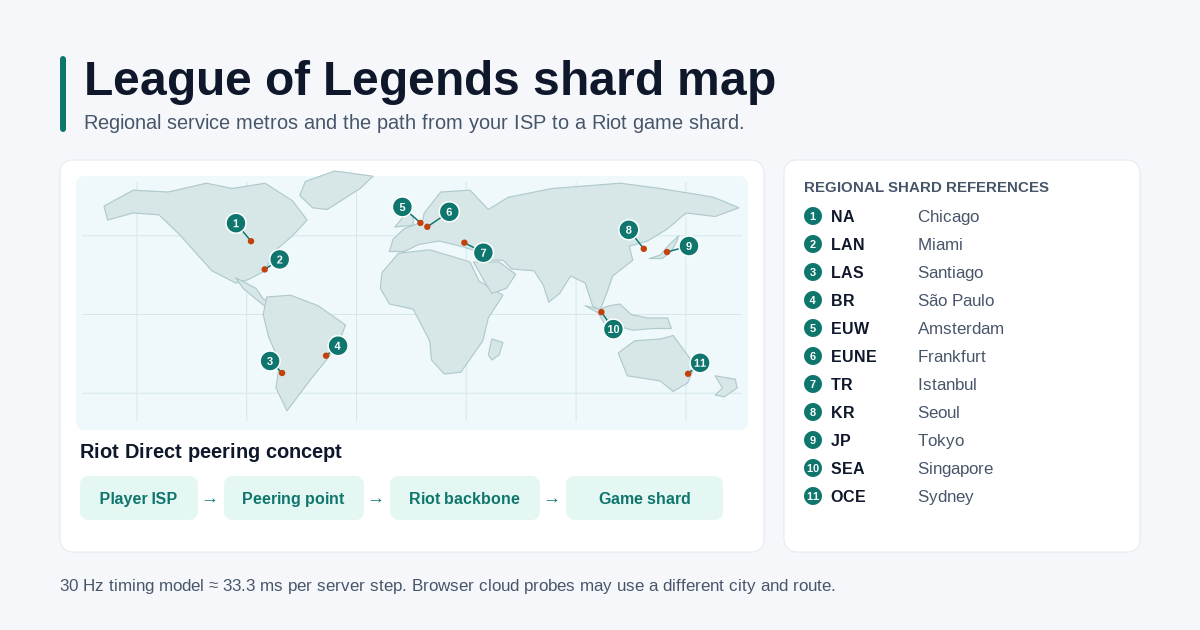
A LoL shard is a regional service assignment, so it determines where an account enters queues rather than acting like a per-match server drop-down. Riot's regional list includes North America, EU West, Europe Nordic and East, Japan, Oceania, Brazil, the Latin American regions and multiple markets in Southeast Asia. An account's region and the players available there matter along with the expected latency. Check current Riot transfer eligibility before planning a move. Riot's League of Legends regional server list.
Riot Direct exchanges traffic with networks at points of presence, then transports that traffic toward its game infrastructure. Riot's network engineering team identifies Chicago as its North American League location and describes routing to a central game location per League region. The wider internet can take a different path to a cloud provider in the same state. For example, a local ISP may exchange traffic with Riot nearby while handing cloud traffic to a carrier in another city. Either path can come back faster. Riot Direct's network architecture.
The Seoul, Tokyo, Sydney, São Paulo and Singapore readings use same-metro reference points for the tool's selected shard mappings. LAN uses a Virginia reading as a wider-area reference for Miami. Any displayed offset in the League of Legends ping test is a geographic estimate and should be read separately from the raw sample. A different interconnect or access network can change either direction of the route. Confirmation comes from the League HUD, particularly when two browser readings are close.
What LoL ping is good for ranked or combos?
Stable LoL ping below 35 ms usually gives a responsive baseline for fast movement and chained inputs. Around 35–65 ms is a reasonable range for most ranked roles, and 66–105 ms can make tightly timed inputs and precise skillshots feel more demanding. Above about 105 ms, check the account's shard and how consistent the route is before making a purchase or changing your setup. These bands are practical guidance, and no band produces zero input delay.
For Riven, use Practice Tool to repeat a short sequence with the same animation timing. For Ezreal, cast at a moving target and check how consistently your own movement and aim feel. A calm lane with a steady 65 ms can be easier to read than a nominal 28 ms connection that jumps above 130 ms every time a device sends photos. A server cadence around 30 Hz corresponds to approximately 33.3 ms per update, but that reference interval does not represent the complete input-to-display delay. Animation rules, prediction and rendering all contribute.
Support players can practice reaction timings apart from mechanical combos. Cue a familiar enemy animation and watch the movement between entering a command and seeing the result. Junglers can compare clear timing or Smite practice across sessions without relying on one contested objective. ADC players can test the feel of alternating attack and movement commands. When delay is stable, the rhythm can be learned. Sudden changes are harder to compensate for and warrant a gaming lag timeline.
Why did your LoL ping rise suddenly?
When LoL ping suddenly rises, first check whether the change affects all destinations or just your usual League shard. Reproduce a brief test over Ethernet with game updates and uploads paused. If the League of Legends ping test becomes stable after changing the local link, Wi-Fi airtime or upstream scheduling is a stronger lead than shard distance. If only a single game remains affected, note the exact shard, time, match HUD reading and server status before looking for an ISP or publisher issue.
The lag timeline's requestAnimationFrame line measures browser callback spacing, not League's external engine frame times; use PresentMon, MSI Afterburner or CapFrameX for game frame-time investigation. If FPS falls while the League HUD latency stays steady, focus on client performance. If both readings worsen under load, isolate one change at a time so you can see which pattern responds. An ongoing, repeatable gap on a wired route may justify looking at the game booster route calculator, but start with an offline recording of your baseline. A separate game makes a useful comparison too. The VALORANT region latency comparison illustrates how another Riot title uses a broader server selection within a shard.
Related diagnostics
Frequently asked questions
How do I show latency in a League of Legends match?
In a League of Legends match, press Ctrl+F to show ping and FPS. The display shortcut can be changed under Options, Hotkeys, Display. Roughly 30 Hz is a server timing reference, not a fixed 33.3 ms end-to-end response.
What is good LoL ping for ranked?
Stable 35–65 ms is generally comfortable for ranked. Players doing fast cancels or tight reactions may notice a benefit from getting below 35 ms.
Why is the Chicago LoL server represented by Ohio?
The browser checks a Columbus cloud endpoint as a Midwest reference. Routing and distance to the Chicago Riot host can add or subtract time, so confirm in the game.
Can my League account choose any server in the table?
The account is tied to a League region. A global table helps compare routes; Riot controls account and transfer eligibility.
Why is the browser faster than Riot Direct?
Your ISP can take separate paths to the cloud and Riot, and both requests end on different services. A lower cloud median is useful route context.
Does a 33 ms tick mean my champion always responds 33 ms later?
A 30 Hz reference gives a 33.3 ms interval between updates. Actual command response varies with network travel, processing, animation and client frame timing.