
Best Game Booster: Routing Worth Calculator
Compare your in-game ping with an estimated fiber floor and find the providers that fit your setup.
Game Booster ROI & Physics Floor Calculator
Enter ping from your game’s HUD to estimate how much of it could come from routing overhead.
- Great-circle distance
- Modeled fiber floor
- Estimated routing overhead
The estimate assumes about 200 km/ms in fiber and adds an 8 ms switching allowance. Actual cables, access links, and game timing can change the gap.
Provider matches
Provider links go directly to the official sites. Gaming Ping Test earns no commission from these links. Prices and trial eligibility vary by region and platform.
| Provider | Platform | Pricing | Trial | Routing | Pros and limits |
|---|---|---|---|---|---|
| ExitLag | Windows, Android, iOS | US$6.25–$9.99/mo equivalent on personal plans | 3-day desktop trial for eligible new users, no card. Mobile eligibility and duration vary. | Multipath routing and multiple internet connections on supported configurations. Routes supported game traffic. The vendor page does not specify the tunnel protocol for every platform. | One personal plan lists both desktop and mobile access. Console support is outside those personal-plan platform listings. |
| GearUP Booster | Windows and mobile apps. Console via supported router or PC sharing setup. | US$6.99 mobile / $9.99 router membership at the official shop. Check PC checkout separately. | Generally 3 days where offered. Payment method required and renewal may be automatic. | AIR switches between supported game servers. Multipath can switch routes to the same server. Routes supported game traffic. Transport details vary by app and are not fully documented publicly. | Separate mobile and supported console configurations. Console routing needs a compatible setup. Memberships and trials vary by product. |
| LagoFast | Windows, macOS, mobile, and supported console setups | US$9.90 monthly list price in sampled checkout. Longer promotional terms can cost less per month. | Provider advertises an eligible new-user trial without a card. Confirm by device. | Vendor documents multipath and automatic node selection. Routes supported game traffic, including games that use UDP. Tunnel protocol varies by setup. | Desktop, phone, and console options let you test on the device you play on. Console setup, supported titles, and trial access depend on device and region. |
| NoPing | Windows client | US$6.30–$8.99/mo equivalent on listed quarterly and monthly plans. Longer promotions can cost less. | 1 day for eligible users, no card. | Vendor lists up to five parallel routes and separate multi-connection failover. Game routing for supported titles. The plan page does not publish a per-title tunnel protocol matrix. | Short card-free trial and parallel-path options. The listed desktop plan targets Windows. Link quality depends on the routes available to you. |
| Mudfish | Windows, macOS, Linux, mobile apps, and compatible OpenWrt setups for console | US$4.99–$99.99 credit top-ups. Pay per traffic or use subscription items. | Eligible verified accounts may receive a small amount of test credit without a purchase. | Choose one relay node or two sequential relays in advanced mode. Default client-to-relay transport is UDP. TCP and other options are available. | Pay-per-traffic can suit occasional play and exposes relay choices. Setup and usage billing need more attention. Console use requires a compatible router setup. |
| Overhead above modeled floor | What it suggests | First step |
|---|---|---|
| ≤12 ms | Limited routing headroom | Keep the existing route if stable |
| >12 to <15 ms | Near the model uncertainty | Repeat on the same live game server |
| 15–35 ms | Possible avoidable overhead | Run a controlled short trial if it fits the platform |
| >35 ms | Investigate a large route gap | Rule out local congestion and then compare alternate routing |
| 2.4 GHz with spikes | Likely local wireless contribution | Repeat over Ethernet before paying |
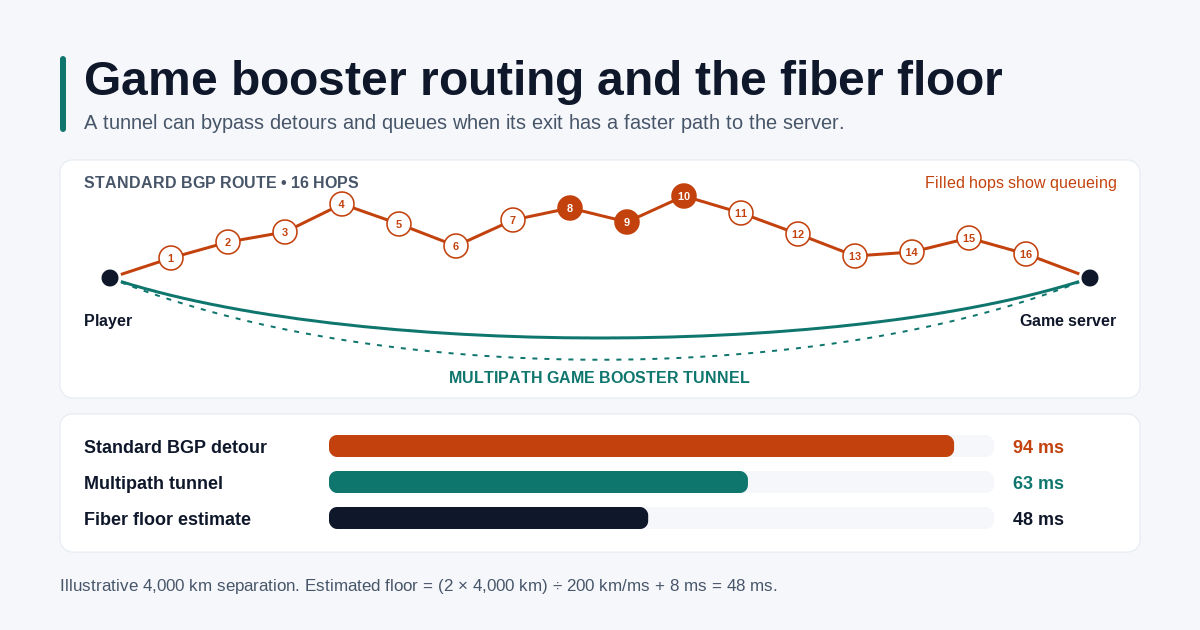
When is a game booster worth trying?
A game booster is worth testing when an eligible game server stays unusually slow on a quiet wired connection. A routing service can place a relay on a different network or use several paths, hoping to avoid a slow exchange. The farther your measured round trip sits above a reasonable fiber floor, the more room there may be to save. Use ping from the match itself for the calculator above. If you only have a browser estimate, first shortlist the region with the Gaming Ping Test and confirm the game destination.
The best game booster for one route can slow another. An ISP with a direct, quiet link to a game network gives a relay little useful work. Some traffic reaches a relay quickly and then takes an indirect path onward. Other routes avoid an exchange that struggles every evening. Time the same server in both conditions and record whether a change persists over several matches. The gaming platform and supported titles decide whether a provider can route your specific traffic in the first place.
The calculator uses the numbers you enter: it cannot read external game-engine frame times or diagnose a GPU, CPU or Wi-Fi fault. Local wireless interruptions change the decision. If your device shares a busy 2.4 GHz channel and brief spikes disappear over Ethernet, fix the local link first. The relay sees traffic only after that traffic leaves your home network. A flat but high route follows a different pattern from a route whose short peaks line up with uploads. The gaming lag spike test helps distinguish these patterns before you search for a game booster.
How do you estimate the fiber floor?
Pure fiber propagation is approximately 200 km per millisecond of one-way light travel. For one-way great-circle distance D, the modeled propagation RTT is 2D / 200 ms; the calculator then adds a separate illustrative 8 ms local switching/NAT allowance. Thus D = 2,000 km gives about 20 ms propagation plus 8 ms, or a 28 ms modeled floor. An imagined 58 ms match RTT would leave 30 ms above that model. This modeled fiber floor is an estimate, not a guaranteed minimum for every game server. The allowance is not a physical constant and is not measured per route. Cloudflare's explanation of propagation in fiber.
A great-circle line approximates the shortest surface distance between the selected player-city and target-hub coordinates; the calculator uses preset approximate city pairs or your manual distance, not a traced cable route. Real cables turn around geography, approach landing stations and connect through facilities. Equipment can queue or schedule traffic, and the reverse direction can use different links. The result is an approximate route baseline for your city and game hub. A value below the model can reflect your actual location near a city edge, a closer assigned server, a smaller switching cost, or the scoring interval in the HUD.
Subtract the fiber floor from the current game ping to estimate the remaining delay. Up to about 12 ms leaves little reason to expect better routing. A 12–15 ms gap sits near the uncertainty of the assumptions and merits a repeat measurement. At approximately 15–35 ms overhead, some routes can benefit enough to justify a short trial. Beyond 35 ms, there is more room to investigate detours, and other causes can still account for the gap. Calculator savings bands are illustrative. A provider cannot promise your specific reduction from the model alone.
How should you compare game booster providers?
Start with platform compatibility, the exact game and the server region. Some console modes run through a PC, router or another supported host. Check the stated setup before assuming a provider has an app on the console itself. Some mobile offerings cover games different from those on desktop. Verify your platform, title and destination on the provider's official product page, then check whether the trial needs payment details and when billing begins. ExitLag's public desktop trial and GearUP's mobile/router shop listings: Verified Nov 2026 — check official vendor page before subscribing. Other listed checkout amounts and eligibility were recorded in November but were not all independently reconfirmed; prices, trials and renewal rules can vary. See ExitLag trial terms and the GearUP shop.
Choose subscriptions or metered traffic based on how you actually play. Recurring plans can be easier to understand for consistent use. A pay-per-traffic option can suit occasional matches if you control which traffic it sends and understand its credit rules. If the provider advertises multipath, check how it handles your game's UDP traffic. A mode can duplicate selected traffic or carry it through an alternate relay, depending on the product. Bandwidth accounting, relay choice and congestion can change the outcome.
Use a short trial, if available, to run an alternating comparison. Keep the game server, device and connection fixed, take a baseline with the booster off, play again with it on, then repeat in the same order. Compare median delay, repeated spikes and any disconnects instead of picking the single lowest number. The VALORANT server comparison helps pick a queue eligible for testing. The Fortnite region ping test can help you recognize a subregion change that would otherwise skew the comparison.
What does a good trial result look like?
A useful game booster trial repeatedly improves the route and keeps it stable during the hours you actually play. For illustration only, a hypothetical change from 84 ms to 62 ms across matched sessions would be a clearer lead than one good screenshot on a new server; these are not measurements from a field trial. If the median falls while the peak rises, try a second session and check whether rubberbanding or missed inputs changed. Retest your usual routes, since a service tuned for one title can degrade another. Find the length of the billing period before deciding what the measured improvement is worth to you.
Provider listings give you a starting point based on platform, billing and trial eligibility. The links go to providers for current terms, and the tool explains whether any link carries an affiliate relationship. Keep a written comparison and the test conditions in case you later change ISP, router or game shard. The best outcome can be a shorter free route, a wired setup that settles the spikes, or enough consistent improvement to choose a paid service with confidence.
Related diagnostics
Frequently asked questions
Can a game booster guarantee lower ping?
Results vary by ISP, server and time of day. A relay can improve an indirect route, and it can add delay to an efficient one.
How do you calculate the theoretical fiber floor?
For one-way distance D in kilometers, pure propagation RTT is approximately 2D / 200 ms. The calculator separately adds an illustrative 8 ms for local switching/NAT. Preset distances approximate selected city and hub pairs; you can instead supply a manual distance.
Can a booster fix Wi-Fi interference?
A relay affects the path beyond your home link. Compare Wi-Fi with Ethernet first if short spikes are the main problem.
Should I use a subscription or pay for the traffic I use?
Compare how often you play, which traffic uses the tunnel, and the provider’s billing policy. Verify current terms before purchasing.
What is the best way to test a booster trial?
Alternate off and on across repeated matches on the same server. Compare median, peaks and disconnects under similar background load.
Do PC game boosters work on consoles and phones?
Support varies. Some providers require a PC, router or dedicated process for consoles and offer separate mobile products. Check the exact game and device.